Software versioning, releasing, and distribution
How 11ty manages releases
- (Optional) Update minor dependencies in package.json
npx npm-check-updates- or
npm outdated+npm update --save
- If the minimum Node version changed, make sure you update
package.jsonengines property.- Make sure the error message works correctly for Node versions less than 10.
- 0.12.x+ requires Node 10+
- 1.x+ requires Node 12+
- 2.x+ requires Node 14+
- 3.x+ requires Node 18+
- Make sure the error message works correctly for Node versions less than 10.
rm -rf node_modules && rm -f package-lock.json && npm installnpm audit- Make sure
npm run check(eslint) runs okay - Make sure
npm run test(ava) runs okay - Update version in
package.json- (Alpha) Use
-alpha.1suffix - (Beta) Use
-beta.1suffix
- (Alpha) Use
- Run
npm run coverage - Check it all in and commit
- Tag new version
- Wait for GitHub Actions to complete to know that the build did not fail.
- Release
- (Alpha)
npm publish --access=public --tag=canary- NOTE: the tag is
canarybut expects-alpha.suffixes inpackage.jsonversion, read more: https://github.com/11ty/eleventy/issues/2758
- NOTE: the tag is
- (Beta)
npm publish --access=public --tag=beta - (Main)
npm publish --access=public
- (Alpha)
- (Optional) Build and commit a new the
eleventy-edge-cdnproject to generate a new Eleventy Edge lib.
Unfortunate note about npm and tags (specifically canary here): if you push a 1.0.0-canary.x to canary (even though 2.0.0-canary.x exists), it will use the last pushed tag when you npm install from @canary (not the highest version number)
The CI workflow only runs tests
They do not release in CI. Releasing is manual. eleventy/.github/workflows/ci.yml at main · 11ty/eleventy
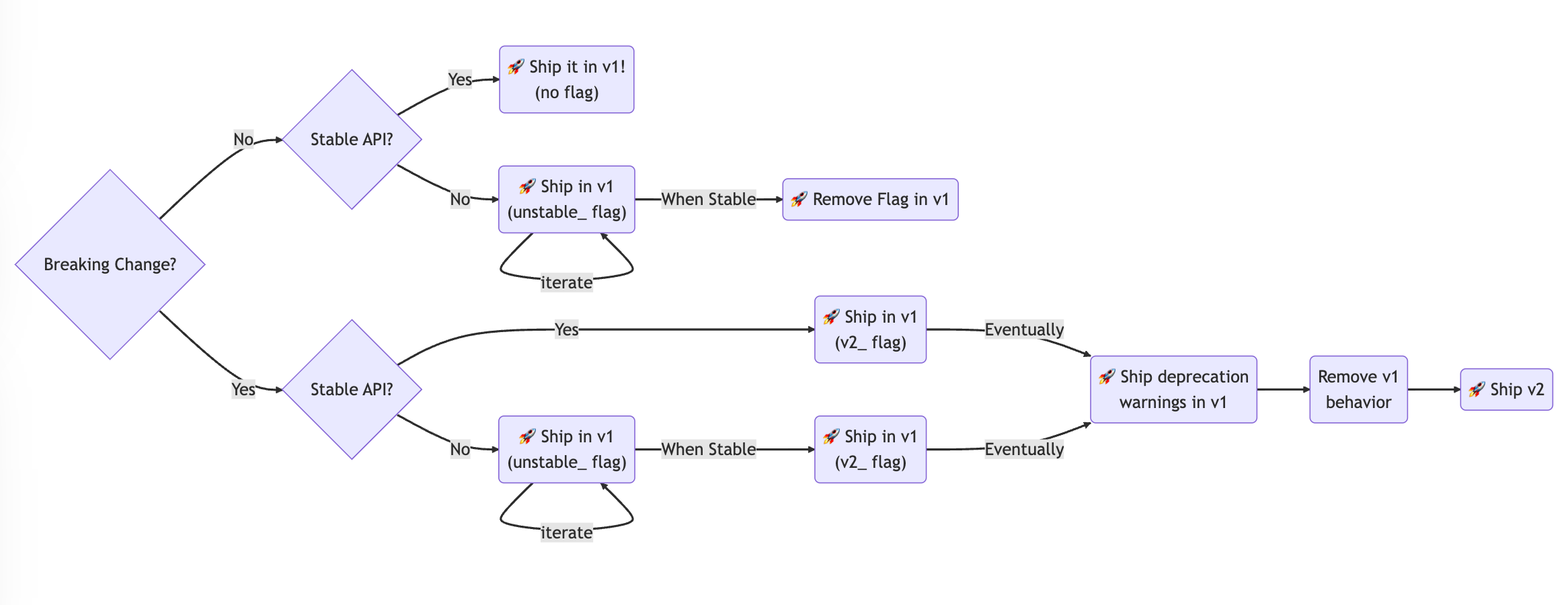
The Remix strategy
https://remix.run/blog/future-flags
Remix uses "future flags" to incrementally release breaking changes in a way that users can opt into by enabling the relevant flag. The next major release is just turning those on by default and removing the flags from config.
Every change is handled like this:
The Node.js change strategy
Here is one process inspired by the Node.js project:
- Every commit changes only one system at a time. The commit message starts with the name of that system.
- For example,
lib: updated foo to bar - This forces your systems to be able to be modified independently
- For example,
- The Pull Request is the unit of change
- A knowledgeable maintainer of the project adds a label indicating the semver bump of that PR
Distributing application binaries
Targets have the naming convention {appname}-{arch}-{vendor}-{os}. For example, foo-x86_64-apple-darwin.
When you prepare for distribution:
- Compile the binary to a target with the name of your command (build ->
foo) - Create a zip archive of that binary using the naming convention (
foo->foo-x86_64-apple-darwin.zip) - Each of these zips are what gets distributed
This way, users download the appropriate ZIP for their machine, but it unzips to just the application name.